Saturday, February 20, 2010

Microsoft Surface(Revised)


In my blog today I would like to discuss the Microsoft Surface. the Surface is a large multi-touch computer that allows users to interface with technology in a whole new way. This technology has a wide variety of business and personal uses that stands to change the way that people view computers. Some companies like AT&T have already began to capitalize on this technology, with many more likely to follow suit. The surface has broad implications in the business world, where it has potential in many industries from retail outlets and restaurants, all the way to manufacturing or office use.

The Surface has four main areas that differ it from any other computer system. First is the direct interaction that the user has with the computer; there is no keyboard or mouse, and it is not just a simple touchscreen either, as the Surface also can be instructed by gesturing. Secondly it is a multiple user computer. With a 30 inch screen it is easy for several people to gather around and interact with each other using the Surface. Third development adds on to the second, saying that it is directed from multiple areas. While object recognition is the last and most fascinating area. This feature simply lets you place objects on the screen, and will provide different responses depending on the object.

The Microsoft Surface has a distinct makeup, unlike any other computer system. It has a 30-inch screen that sits on top of a table like build. It is 22 inches high, 21 inches deep, and 42 inches wide. Important features include the powdered steel interior frame, and acrylic top surface. The system is run by a custom version of Windows Vista has capabilities to support Ethernet, wireless, and bluetooth connectivity.

Friday, February 19, 2010

Thought controlled computing, and gaming!

After talking about automation in class i got interested and searched the web for something related to the Olympics. Visitors to the Vancouver Olympics this year are in for a special treat. A canadian company has created the largest thought-controlled computing installation, and is letting visitors try it out! It is an experiment that allows people to use their brainwaves through a special pair headphones to contol the lighting at three major Canadian land marks, one being Niagra Falls! Talk about Automation! "The headsets have an external probe that touches the wearer's forehead, to measure baseline brain activity." It measures the brain's electrical output and alpha waves, realated to relaxation, and beta waves, related to concentration. When you relax or concentrate it sends a signal to change the lighting accordingly.

"As consumers get more comfortable with going beyond the keyboard and the mouse to interact with their computers, companies are looking for more ways to make the experience better." Posted by Priya Ganapati, on february,3,2010 @ Gadget Lab Blog, a blog for people to interact about gadgets and technology. She thinks harnessing brain waves or other biological data are slowly emerging as a third option, especially in gaming.

There is a company called Neuro Sky, and they make special head phone.They are said to translate gamer's brain waves into action. Microsoft is working on alternate forms of input, my boyfriend told me about Project Natal. I youtubed it and saw that they say they will add gesture recognition to xbox 360 systems late this year. Check out this video about Natal on youtube..Its amazing! Cant wait to see what we have in 5 years!


IKEA and modularity


The discussion in class on modularity led me to think of other ways that modular design is implemented. The essence of modularity is that, as was stated in class, it "improves innovative capacity" through the utilization of coupling and cohesion. This is true when we think of parts used in an assembly line, or parts that are used in a computer. There are, however, other ways that modular design can be useful to people.

IKEA products are a good example of the usefulness of modular design. Their merchandise allows customers to design living solutions that conform to each individual's decorating styles and space considerations. Since many of IKEA's products feature interchangeable parts, consumers can rearrange or add on units as they see fit, or as they can afford them. This leads to unique storage and decorating setups that are custom fitted to the needs of each individual consumer, without having to make each unit individually.

The benefits of this system are the customization that was mentioned in the previous paragraph, as well as a huge cost savings due to not having to special order individual units if you want them custom fitted to your home. Also, because the parts are interchangeable, if the customer decides that they don't like the configuration they can move or change the way it is configured. The pieces can also be moved relatively easily to different rooms in the living space since they are not made of large, heavy pieces.

The biggest complaint that I have in regards to IKEA's designs are that they sometimes seem cold and impersonal. I would like to see a greater variety of design ideas that incorporate different materials (since many of their products seem to be made of plastic), and less boxy furniture. This, however, is just my personal taste.

IKEA's website can be viewed at http://www.ikea.com/us/en/

Microsoft New Touch Table


Last week on monday we looked at the new product by Microsoft, the touch table. This I think, is just incredible. I mean, who knew we could have something of this magnitude that can do just about everything. I couldn't get the video to post on here but if you go to http://www.youtube.com/ and type microsoft new touch table, there are a few videos you can watch that show many of the new features that this product offers.

It just amazes me that a video table can actually do all of these things. If you lay your camera on the table, it can pull out all the pictures and they will all pop up on the table for you to see. You can paint or draw on it with your fingers, it allows you to order things off a menu if you were to go to a restaurant and use it. There is no need for a waiter or anything along those lines. You simply click what you want and you can even edit it and what comes on your meal. You can order drinks and have them served right to you and one of the coolest things about it was that you can actually set your credit card on the table and it will read the barcode and get all of your information. It allows you to choose on the table, what tip percentage you want to leave and it calculates that and then adds that to your tab and you are all set to leave. There was even an application where you can put a live moving jigsaw puzzle together like for example they showed us a racecar driving and each square was a part of the picture but it was in action moving so I thought that was pretty neat.
Some bars and restaurants already have these tables and they are expected to keep growing in more areas. They say in the video that they expect people to start having these in their households in three to four years but the video was in 2008, so that would mean within the next year or two. However, the price tag on these is outrageous so I don't know how many people would be willing to actually buy them that can afford them. Certainly they won't be a common household item like a television or what not, at least not for quite some time.

New Xbox

The world of video gaming has come along way. From the beginning with Atari's world of pong to the Nintendo wii which has a whole new way of interacting with the system. The wii allows you to play along with an interactive controller. For example in a baseball game you swing the controller and your payer swings the bat. Will Microsoft has stepped there game up and they are now coming out with the Xbox Natal which surpasses the wii's ability to interact.

The Xbox Natal is really a new way to game and with this comes a new way to interact with your system. This new system has no controller, it makes you the controller. It has the ability to recognize who you are and what your doing. This new way of controlling your system leads to all kinds of new ways to play. Instead of swinging the controller you can scan your bat and the use your own bat. This allows you to use your own bat allowing for you to pretty much play the game without leaving your living room. This system has all kinds of new features.

The Xbox Natal allows you to video chat with your friends from your couch. The scanning system allows for a whole new way of sharing. Lets say you draw a picture and you wanted to show your friends. The Natal allows you to scan that picture and send it to all your friends. This system really is amazing and just goes to show how fast the technology is evolving. This has to make you wonder what they'll come out with next.

Windows.


When thinking of Windows, they first design that comes to my mind is windows 95. There are plenty more versions of windows that I didn't know it about. So in class, Drake showed the us a video clip on Youtube and I was surprised by how many windows there were. I'm only 18 years old so I wasn't around to see the very first windows. I wonder how did Windows develop. Did they take surveys and got the public's opinion about the program or any other method.

In the clip you can see how far windows has came a long. I think its amazing how technology continues to innovate. The very fist windows was created in 1985 and it was called windows 1.0. In sense, it doesn't even look realistic compared to what we have now. To watch the evolution of computer programming is all new to me. Just to think that there is more technology out there. Also some that is already developed, but not available to the public. For example. the Air Force has many technologies that we are not open to.

There are other computer programs, but windows is the most popular. I've only constantly heard about Apple and Windows. That's about it. I know there's Linx and stuff like that. Honestly, I don't care about the others. They don't compete with Windows and Apple.

Thursday, February 18, 2010

Malicious softwar

Malicious software is nasty and its everywhere. But how exactly does this stuff get into your computer. It seems like if your computer is connected to the internet it seems like it is just a matter of time before your computer is infected by some Trojan, virus, or malicious applet. One good step to take to prevent an invasion is to never go to adult websites. Another good precaution is to stay away from using pirated software. A lot of it contains viruses and trojans. Keygens make valid keys for applications and unlock them illegaly. These almost always contain some sort of virus or trojan as well.

Windows Vista and Windows 7 (Modularity)


Since we talked about Microsoft in tuesdays class, I wanted to talk about Windows Vista and Windows 7. Windows Vista was hardly a success Microsoft wanted it to be, if anything it was a failure. Now Windows 7 is more modular than Vista. Meaning that all you get with the default version of Windows 7 is basic GUI (graphical user interface). This may only serve to confound consumers even more than they already are.

With Vista, Microsoft saw it was important to have Windows Vista Home Basic, Home Premium, Business and Ultimate. This was confusing for many which had led to law suites, and also the differential in price.

The problem was mainly with Vista Basic. It lacked Media Center, Windows DVD/movie maker and several other features that were included with the more up-market versions of Vista, but you had to pay for the extra.

Microsoft failed to provide proper information on this to the Customer and those that were unlucky enough to wind up with Basic found that some systems, even after an upgrade to Home Premium were unable to use some of the new features.

Vista can be upgraded to other editions, from Basic to Home Premium to Ultimate. All the versions of Vista are included on the same DVD whether you buy Basic, Home Premium or Ultimate but your license key determines which features get unlocked, and that cost money ofcourse.
Please comment on this and let me know what you think of windows Vista, because I have it on my computer but I'm really thinking about purchasing Windows 7.

Modular Design


After talking about modules in class, I decided to do a little research on modularity. My search lead me to modular design information that strongly correlated with our class discussion. Modular design is used to subdivide a system into smaller parts, these smaller parts are whats known as the module. The module can be created independently of a whole unit, and then can be used in many different systems. Modules are implemented in these systems for multiple functions.

One function of using modular design is cost reduction. This reduction is due to the need for less customization of units and in some cases saving the cost of lost time. Cost reductions are also found in the flexibility of the module and the ability to replace just the module and not an entire unit.

Modular design is found in everyday life. It is used in our computers through programs such as Microsoft Office. Computers also use modularity to make the computer manufacturing process more streamlined. Modular design is used in cars, telephones, and construction. The advantages of modularity make many processes in life much simpler. The ability of modularity to allow us to adapt to our environment and problems more quickly is perhaps the single most important affect it has on us.

Modularity


Recently, I've come across two different examples that lead me to think about modularity. The first is a pretty obvious one, given current developments. The second is a tech that has just been displayed for the first time at the Mobile World Congress currently happening in Barcelona, Spain. The two offer a dramatic contrast in terms of size and highlight the benefits of modularity and its alternative, integration.

The first is the more obvious: the International Space Station. I've been following a Japanese astronaut currently on the space station on twitter. He's been charged with the task, among others, of taking pictures of the earth from the space station. The results are pretty amazing. But one of the coolest pictures he took was of the space shuttle endeavor approaching. This picture got me to thinking about modularity because of what the shuttle carries in its loading bay. The cylindrical object you can see there is called the "cupola" or Node 3. It provides some amazing views to the astronauts on board. One of the amazing things about the mission is how quickly they were able to attach the new piece. Within a couple days of arriving, the astronauts had already fully attached and made functional the cupola. Such ease of piece-by-piece construction is a prime example of one of the benefits of modularity. You can watch them continue to work on the ISS live here.

The second example is the new technology on display by SK Telecom. What they've presented is a SIM card (like the one's used by T-Mobile and AT&T in their cell phones) that carries the phone's processor, memory, 1 GB of storage, and even the Android OS. I know, I know, this is the opposite of modularity. Its an example of a competing trajectory of technology development. The benefit of such a SIM card is that when you want to change phones (whether for a new form factor, bigger screen, etc.) you can simply switch the SIM card from your old one to your new one. This means no worrying about contact transferral, or manual transferral of info from to the other at all. It also potentially means that you could have several devices (phone, netbook, tablet, desktop) that could all utilize the same SIM card for their data, OS, processing, memory, storage, and internet access.

Finally, while I was typing this, I thought of another example of modularity vs. integration. Android is an example of software modularity in that it is designed to be implemented on a wide variety of devices that have very wide-ranging processor power, screen size, ram, etc. Apple's iPhone OS is an example of software integration. The only device you can get that OS on is an iPhone. The benefits of this method are obvious. It is easier to design software for a very specific set of specs and ensure that the software utilizes that spec list fully. The difference of approach demonstrates the difference in business model. Apple is in the business of selling hardware, so designing an OS for their specific hardware makes sense. Google (developer of Android) is in the business of generating internet ad revenue . Thus, they simply want the greatest quantity of OS incarnations running on any phone possible to increase the number of people utilizing their services and hence, looking at their ads.

The Microsoft Surface

In my blog today I would like to discuss the Microsoft Surface. the Surface is a large multi-touch computer that allows users to interface with technology in a whole new way. This technology has a wide variety of business and personal uses that stands to change the way that people view computers. Some companies like AT&T have already began to capitalize on this technology, with many more likely to follow suit. The surface has broad implications in the business world, where it has potential in many industries from retail outlets and restaurants, all the way to manufacturing or office use.
The Surface has four main areas that differ it from any other computer system. First is the direct interaction that the user has with the computer; there is no keyboard or mouse, and it is not just a simple touchscreen either, as the Surface also can be instructed by gesturing. Secondly it is a multiple user computer. With a 30 inch screen it is easy for several people to gather around and interact with each other using the Surface. Third development adds on to the second, saying that it is directed from multiple areas. While object recognition is the last and most fascinating area. This feature simply lets you place objects on the screen, and will provide different responses depending on the object.
The Microsoft Surface has a distinct makeup, unlike any other computer system. It has a 30-inch screen that sits on top of a table like build. It is 22 inches high, 21 inches deep, and 42 inches wide. Important features include the powdered steel interior frame, and acrylic top surface. The system is run by a custom version of Windows Vista has capabilities to support Ethernet, wireless, and bluetooth connectivity.

Wednesday, February 17, 2010

When talking about computers, it's hard not to think about how they have had an impact on everyday life. Whether it be simple mundane tasks, to elaborate calculations, they're everywhere you go.
Just by getting up in the morning to your digital alarm clock, or your cell phone, you've already depended on a computer. And then, you check the weather. Again, someone's computer played a part in making up the forecast, and then broadcasted to you where ever you are. And then your car. It's pretty obvious so I won't even delve into that. But even over the fast 10-20 years, the amount of interactions the average person has with computers has dramatically changed.
Even if you wanted to, there is no real way to get away from computers. It's around every corner, and even in the traffic lights that you go through everyday. Without computers, life would be a completely different, and in my opinion, much more difficult way of life.

Modularity

When I think of modularity I think of interchangeable parts like batteries. Small electronic batteries and large automobile batteries. All remote controls require small AA or AAA batteries. They can be replaced by anyone, no expert needed. This helps the small electronic manufacturer save money. No extensive training required for normal maintenance. Anyone can pop them in and out whenever needed.
Automobiles also require batteries. They just like the small batteries that are in remote controls, just bigger and heavier. Anyone that can lift one, can install or replace one. When thinking of the automobile in its entirety, it contains a lot of interchangeable parts. From the tires to the windshield wipers. The interchangeable parts are usually the cheapest and the ones that require to be replaced most often than others. You could dissect a car or truck and see that close to 50% of it (if not more) is interchangeable.

The "Reader"

In last class, I know the output and input of a computer and the storage of computer. When I first touched the flash drive, I know people always called it “reader”. It just likes USB drive. People insert the single-chip of cell phone into this “reader”, and then insert “reader” into USB socket. Therefore, people can transmit and read the information between two different cell phones. It is another way to change information.
There are some different style and shape readers, such as CF reader, SM reader, PCMICA reader, memory reader, USB reader and double deck reader. When we use a kind of electronic equipment, we need a kind of material storage which is used for changing data. The semiconductor reader can achieve this goal. The Flash RAM is popularly used now, because it has potable, shockproof function. It is used in digital camera, cell phones, MP3 and PDA. With the appearing of electronic reader, more and more various chip cards which are sold in the market can be read, such as Smart Media, Compact Flash, Memory Stick, Multi Media Card, SD Memory, IBM Micro drive and Micro SD Card. If we lack such a “reader”, we can’t change and share the information very quickly and fluently.

The advantage of the reader is magical, but it doesn’t read the software, it reads different flash cards. It is a new kind of storage tool, and it is designed to provide convenient way for storage.

modularity

Sticking with todays topic of modularity, I wanted to talk about something that all of us use in our everyday life without even recognizing it. In fact, I had no idea that what I was doing was related to this strange five syllable word until today. We use modularity nearly every single day of our lives and don't even blink at the amount of innovation that has gone into it. 

An example of modularity that sparked my interest is the evolution of word processing documents. Sounds thrilling right? Wrong, it's not. However, what I found interesting is that we utilize a form of modularity every time we type up a two paged, double spaced wikepedia summary for one of our classes. Todays word processors are able to function completely independent of each other, yet through some magical process, seem to open and edit each other's documents with flawless ease. These programs are great examples of modularity in our lives. They operate completely independent of each other yet coupled with a minimal upgrade or built in convertor, they are able to work in cohesion between different computers and program versions. For example, no matter what version of Microsoft Office you happen to be using, you are able to open and edit your document with ease on a multitude of computers and operating systems. With the addition of the "x" on the end of the file name, some of the older versions may require an upgrade to open the newer documents. However once this "coupler" is installed, you will be able to open all versions of Office documents with ease. Mac has taken this a step further. Their new "office" package, iWork (Pages, Keynote, Numbers) is able to seamlessly open and edit all Microsoft documents, no matter the year or version. They have been able to build an advanced "coupling" system right into their software in order to maximize the ease of which we view and edit documents. If formats are not compatible (fonts, colors, etc.), the program will automatically convert into a compatible format and give the user a comprehensive list of things that were changed. No downloads or file conversions necessary. 

This is not particularly riveting stuff but its important to acknowledge the level of innovation that we are able to utilize on a day to day basis. This idea of modularity that once upon a time helped connect train cars together is now being used to easily integrate thousands of different world wide file formats into one easy user interface. 

The wonderful world of modularity


Modularity has been around for a little bit, but in the computer world it is only as old as computers. Operating systems are a perfect example of using modularity. On the first computers, without an operating system, every program needed the full hardware specification to run correctly and perform standard tasks, and its own drivers for peripheral devices like printers and card-readers. Even then, with the rapid growth of technology, an operating system became necessary.

Why are operating systems necessary? Could you imagine getting on a computer and not knowing where to start? Imagine going to work and not having a desk to work on. An OS serves as an interface between the hardware and the application you are using. There is something called a "kernel" in the OS. A kernel serves as a sort of bridge between data processing and applications. The kernel manages the system's resources, such as the communication between software and hardware components. In other words, the kernel is the biggest component of all operating systems.

This is not the only thing that an operating system handles. It takes care of things such as managing system memory, interrupts (a signal indicating the need for attention or an event in a software command), dual mode operation, and many other things.

This might be a bit much for those of you who only know how to turn a computer on, but the important thing is that it does all of this work for us so we don't have to. My favorite operating system? You had to ask. Go here and you'll see.

So, without modularity, our computers are useless. Although this post barely shows how an operating system works, I hope I have taught you a little bit more about how operating systems work.

Modularity - Windows 7

In class today we learned about modularity and what makes it up. We went over different programs that help us run our computers on a daily basis. We looked at all of the windows that have come out since the beginning in 1985. They released Windows 1.0 in 1985, Windows have come along way since releasing windows 1.o. In 2009 Windows 7 was released and has become very popular and is being installed as the main operating system in many new computers that are sold.
When Windows releases a new operating system, many people are excited about what they will be able to discover and what is new applications on the operating system itself. For me i still have Windows Vista and I'm still getting used to everything that is new about Vista, but i guess i really only use my computer for homework and listening/storing music for my music player. So i guess I'm no expert when it comes to using a computer, but i believe that why they have you take these kind of courses in college, so that you have some basic knowledge on how computers work and what advances have been made in computers and technology.
With Windows 7, there has been new and improved, such as new features including a easy way to access what you want to quickly, by adding your favorite programs to your task bar, and they will be right there for you to get to where you want to quickly on your computer.

Another new feature includes Windows Touch, if you purchase a touch screen with your new computer then you would be able to apply Windows touch to what you are doing on the screen. You will be able to manipulate the computer screen to what you want that to do.

These are a couple of new features that are new with Windows 7, if you want to learn some more information on windows 7, because maybe you want to upgrade your operating system, visit www.microsoft.com

Inovation!!

Wow, this past Monday in class we looked at quite a few new electronic products that will be soon hitting the market. I was in total amazement at some of the things that can be done when some of these technologies are used. Just the thought of all the possibilities that can come out of them is almost scary.

For example the Microsoft surface. This things is so advance that it is unreal. Placing a Microsoft Surface in places like restaurants will changed the food industry in ways never seen before. I have never been so amazed, shocked, or even stunned by anything in my life like I have been by the capability of the Surface.

I have my fare share of gadgets and they have changed they're designated industries, such as music and the ipod. But that change seemed to happen without me even being aware of it. One day I had a ton of cd's and the next 7500 songs on one single device.

Overnight is a understatement for the Microsoft Surface. It will surely change the way people do things.

Uncanny Valley


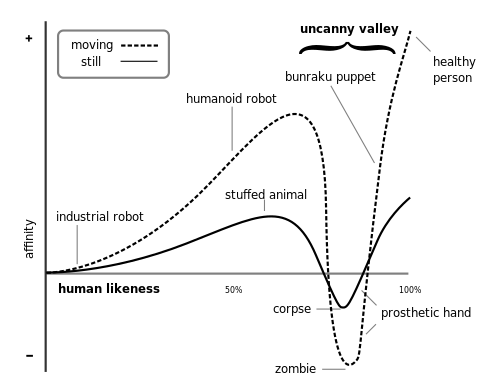
Was anyone else freaked out by that robot dog video? I know I was. That thing was creepy looking. Anyway, it got me thinking about the Uncanny Valley. It is a theory about how humans react to robotic beings. The basis of this theory is that how lifelike, or similar to a human being (or in this case dog, I guess) a robot is, determines how one will respond to it. The Uncanny Valley itself is, in a graphical representation (included in this post) what happens directly before something is exactly humanoid.
The reasoning behind the existence of the Uncanny Valley is complex. Most of the reasons stem from primal urges or feelings in the human psyche. For example, if an android moves in a very jerky fashion, it elicits the fear of losing control of one's bodily movements. Basically, an "uncanny" robot or object reminds one of the possible flaws in one's self. Another reason for the Uncanny Valley has to do with disease. Flaws in one's self can indicate disease. An uncanny robot reminds one of the possibility of contracting a disease, and causes angst.
To sum up, I suppose the reason the robot dog creeped me out so much is because it isn't quite humanlike. Or doglike... It acts similar to a dog, it can even right itself, and walk on uneven terrain. But it lacked a head, made lots of noise, and was made of metal. This makes it uncanny, as it is similar, but not exactly like what it is mimicking.

Tuesday, February 16, 2010

The At-Home Super Computer


This is image is a little difficult to see, but do not worry tonight's blog will tell you all about it. What you see here is Silicon's design for the 2010 PC. It is about the size of a Frisbee and will one day be able to store and process as much information as today's most powerful super computers. Silicon's idea behind this computer is for it to be totally wireless except for a wall power cord plug-in. The computer will be light, fast, storage friendly, and reliable. "SECURITY: The PC will be protected from theft, thanks to an advanced biometric scanner that can recognize your fingerprint. INTERFACE: You'll communicate with the PC primarily with your voice, putting it truly at your beck and call" (Crosby 1).

To complement this advanced computer, Silicon is also designing a "true desktop." The plan is to produce a desk with a monitor touchscreen top. Similar to the touch screens on today's smart phones this desktop will be totally user friendly. Files, a keyboard, internet, you name it; the touch screen "desktop" will be another amazing technological addition to 2010. The 2010 PC and the Desktop will work together through wireless technology to eliminate the hassle of cords.

The final project behind the 2010PC is its ability to control your house. With the super computer technology behind the 2010 PC you'll be able to program the heat in your house, your television, even your coffee maker! According to Silicon, once the 2010 PC is plugged into your home, you'll be able to communicate with it vocally to confirm schedules or create new ones if you desire to do so. In the end, the 2010 PC is going to take computer technology to the next level. The control and freedom of this computer will be unrivaled by anything we've seen yet.

If this Blog has struck sparked your curiosity the website link is:
http://www.forbes.com/asap/2000/0821/087.html
The article was written by Kim Crosby 8.21.00